Call: (713) 489-8138
IT Problems That Quietly Slow Work, Increase Risk, And Create Repeat Tickets



Table of Contents
Slow file access does not stay inside one workstation. It pushes back reviews, delays approvals, and leaves staff waiting while customer work sits open. When field offices lose Wi-Fi or helpdesk tickets pile up, managers lose sight of which issues are one-time events and which ones keep returning.
That is why IT Problems need to be treated as operating issues, not background noise. Unit 42 reported that 86% of incidents it responded to in 2024 involved business disruption, from downtime to reputational damage. Backup uncertainty and vendor delays only add pressure when the business needs a clear answer.
Josh Fuller, Chief Technology Officer at ChaceTech, notes: “Recurring disruption usually means the root cause was never owned, so responsive support has to be paired with planning that prevents the same ticket next month.”
IT Problems That Slow Daily Work Before Anyone Notices
Small disruptions become expensive when they repeat across teams, field offices, and customer workflows. A single slow transfer is annoying. The same delay across estimates, drawings, and customer updates starts shaping the workday.
Leadership can track these patterns before they become larger support burdens, especially when outages cost the business lost revenue, staff productivity, and recovery time. One New Relic survey reported median annual downtime from high-impact outages of 77 hours. The list below identifies patterns worth tracking before they become normal.
-
Slow file movement: Delayed transfers between offices interrupt drawing reviews, estimate changes, proposal deadlines, and client deliverables.
-
Unstable office Wi-Fi: Poor coverage causes dropped meetings, failed uploads, and employees working around the network instead of through it.
-
Repeat helpdesk tickets: Recurring tickets point to unresolved root causes, such as permissions, devices, or network paths.
-
Unclear vendor ownership: Internet, phone, software, hardware, and security vendors can each assume another party owns the issue, stretching downtime.
One construction client had unreliable Wi-Fi and slow file transfers between field offices. We replaced outdated network equipment with managed switches and access points, then continued supporting the environment we installed. The result was consistent coverage, improved speed, and better collaboration across locations.
ChaceTech client data shows an average reduction of 0.2 in recurring IT issues after three months of service.
Common Technology Problems Inside Growing Teams
A team can outgrow informal support faster than anyone expects. One new hire waits for a laptop, another has Microsoft 365 access but not the right folders, and a manager approves software by email with no record for the next request.
Growth exposes common technology problems in support structure, permissions, device standards, and vendor coordination. Without a clear process, staff repeat the same explanations and managers lose track of cost, access, and ownership. IBM reported that the cost of technical debt in the US was USD 1.52 trillion in 2022, which reflects how deferred fixes create real business drag.
-
New hires waiting: Device setup, Microsoft 365 access, and folder permissions need to be ready before the employee’s first customer handoff.
-
Approval paths missing: Purchasing, software access, admin rights, and system changes need named approvers, not scattered inbox threads.
-
Mixed device standards: Mac and Apple support belongs in the plan when teams use those devices, or expectations become inconsistent.
-
Untracked licenses: Renewals, warranties, updates, and spend control suffer when no one owns the list.
-
Scattered support history: Missing documentation slows fixes and forces staff to explain an issue again, even when a similar ticket was handled last month.
These gaps turn routine requests into repeated delays for staff and managers.
Helpdesk support, Microsoft 365 management, vendor management, device standards.
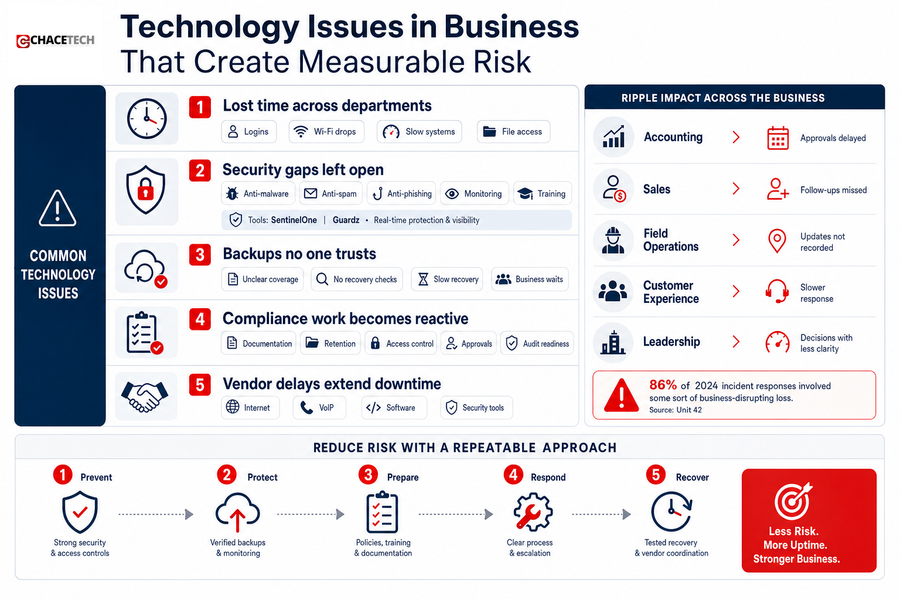
Technology Issues In Business That Create Measurable Risk
Risk often starts with routine gaps: weak backup practices, inconsistent security settings, unclear access control, and slow incident response. These technology issues in business show up when payroll files, customer emails, project folders, or phone systems are unavailable and no one knows the next step.
-
Lost time across departments: Recurring logins, Wi-Fi drops, slow systems, and file access delays create cumulative productivity loss. A study cited by The Hacker News found 759 U.S. hospitals experienced IT outages last July after a faulty CrowdStrike update, showing how one technical issue can affect many services at once.
-
Security gaps left open: Anti-malware, anti-spam, anti-phishing, network monitoring, and employee awareness training reduce the chances that one bad click becomes a larger interruption. One security bulletin reported that 48% of Windows users and 29% of macOS users encountered cyberthreats, while Adobe released updates for 35 security issues across several products in March 2025. IC3 also recorded 859,532 complaints last year, with an average loss of $19,372.
-
Backups no one trusts: If no one can confirm what is backed up or who checks recovery readiness, recovery decisions slow down during an outage. Unit 42 reported that 86% of its 2024 incident responses involved some sort of business-disrupting loss.
-
Compliance work becomes reactive: Documentation, retention, access control, approvals, and audit readiness need routine maintenance. Waiting until a request arrives creates rushed work and weaker records.
-
Vendor delays extend downtime: Coordinated vendor management shortens the path from reporting a problem to fixing the correct system. That matters when internet, VoIP, software, and security tools all touch the same workflow.
Fix Recurring IT Problems Faster
Problems With IT That Support Teams Can Reduce Systematically
Changing IT habits is difficult because people are already busy. You cannot pause operations to rebuild every process at once, so the next steps should reduce repeat tickets without overwhelming staff or adding unnecessary approvals. IBM’s technical debt estimate of USD 1.52 trillion in the US in 2022 shows why postponed cleanup deserves a practical plan for problems with IT.
-
Audit recurring tickets: Review the last few months and group issues by root cause, location, vendor, and affected workflow, such as file access for estimating or email delays for billing.
-
Review network equipment: Check routers, firewalls, switches, and access points, especially where users report weak coverage, dropped calls, or slow transfers between offices.
-
Confirm backup coverage: Verify key systems, cloud files, email, and business-critical data, then document who checks recovery readiness.
-
Assign vendor ownership: Name who owns internet, VoIP, software, security tools, warranties, licenses, and renewals so support does not stall between providers.
-
Plan quarterly: Build a simple rhythm for budgets, replacements, security priorities, and upcoming business changes. Our former IT Director perspective helps turn recurring interruptions into scheduled decisions, and our flat-rate managed IT plans keep security, Microsoft 365 management, and backups under one predictable rate.
Stop Repeat IT Problems
Recurring tickets, slow systems, and unclear ownership drain productivity. ChaceTech helps identify root causes and plan a better path forward.
IT Problems In Business Deserve Local Ownership
When we address root causes, teams see fewer repeat tickets, more reliable collaboration, clearer vendor ownership, safer data practices, and better planning. The stakes are practical, especially when Unit 42 reported that 86% of incidents it responded to in 2024 involved some sort of business-disrupting loss.
If unreliable Wi-Fi, slow file transfers, or recurring tickets keep interrupting your staff, contact ChaceTech and we’ll help you sort urgent IT problems in business from the long-term fixes that belong in the budget. We serve Greater Houston businesses with responsive local support, no outsourced helpdesk, and practical planning.