Call: (713) 489-8138
Staff Augmentation Vs Managed Services: Who Owns The Work?



Table of Contents
-
Staff Augmentation Vs Managed Services Starts With Ownership
-
Managed Services Vs Staff Augmentation Affects Daily Workload
-
Staff Augmentation And Managed Services For Project Pressure
-
Managed IT Services Compared With Staff Augmentation For Uptime
-
Choosing Between Augmented Staff And Managed Services For Your Business
-
Security Accountability Across Staff Augmentation And Managed IT
Choosing an IT support model decides who closes tickets, answers after hours, tracks Microsoft 365 changes, and owns vendor follow-through.
Lori Fuller, Chief Operating Officer at ChaceTech, notes: “The right IT model shows up in the ticket queue first, then in budgets, response times, security reviews, and whether users know who owns the next step.”
Open tickets, onboarding requests, cybersecurity alerts, vendor follow-up, and after-hours incidents compete for limited attention. Outside IT help should be evaluated by who answers, who documents the fix, and who knows the site, users, and approval path.
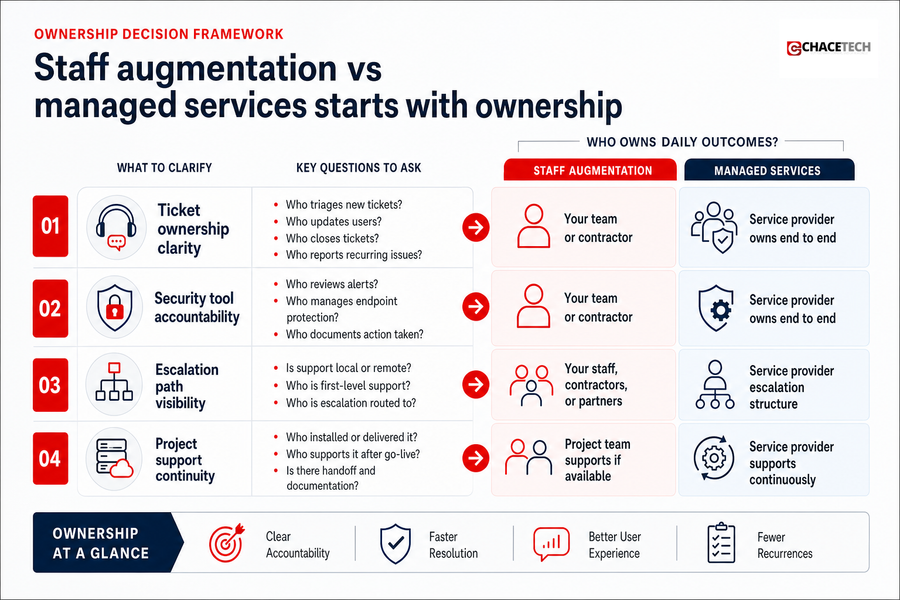
Staff Augmentation Vs Managed Services Starts With Ownership
The question is not which model sounds better. It is who owns daily outcomes when a VPN ticket blocks remote work, a firewall vendor delays approval, or security alerts need review before business opens.
-
Ticket ownership clarity: Ask who triages requests, updates users, closes tickets, and reports recurring issues.
-
Security tool accountability: Confirm who reviews alerts, manages endpoint protection, documents action taken, and follows through.
-
Escalation path visibility: Know whether support is local or remote, whether helpers are full-time staff or contractors, and whether services are outsourced.
-
Project support continuity: The team that installs a network, server, firewall, or Microsoft 365 change should understand how it will be supported later.
Managed Services Vs Staff Augmentation Affects Daily Workload
Picture a small IT team handling password resets, Microsoft 365 group changes, vendor renewals, and a network outage before a client deadline. The problem is not effort. It is too many urgent items competing for the same people.
-
Helpdesk pressure becomes visible: Remote and onsite support keeps user tickets from burying project work and gives employees a clear place to go.
-
Core systems stay maintained: End-to-end IT management covers routers, firewalls, backups, and cybersecurity, so maintenance is not pushed aside.
-
Microsoft 365 changes get owned: Licenses, permissions, shared mailboxes, and group requests move through a clear approval path.
-
Vendors stop drifting: Renewals, warranties, ISP issues, and software support cases have a responsible owner.
-
Budget planning gets cleaner: Flat-rate managed IT supports cost control when security, Microsoft 365 management, and backups sit under one predictable rate.
Staff Augmentation And Managed Services For Project Pressure
Added specialists fit when the pressure is defined and the internal team still owns the environment. Vetted software development, network administration, cybersecurity, or helpdesk support can cover workload spikes, rollout deadlines, or long-term gaps without permanent hiring overhead. Our IT Staff Augmentation gives teams flexible technical capacity when they need rapid deployment or specialized expertise. That fits a broader shift in how leaders think about work: 87% of executives surveyed by IBM believe employees are more likely to be augmented than replaced by generative AI.
That can mean extra hands during a firewall replacement, Microsoft 365 migration, jobsite connectivity issue, or temporary helpdesk backlog. The work moves while internal staff keep context, approvals, and business priorities close.
Related IT Service Models
-
Why Managed Services Matter When Your Team Needs Real IT Ownership
-
Managed Services vs. Professional Services: Choosing The Right IT Fit For Your Team
-
Benefits Of IT Outsourcing: How To Reduce IT Risk And Daily Support Strain
-
Types Of Managed Services Teams Can Count On When Work Stops
-
Break Fix vs. Managed Services: Stop Letting IT Issues Stall The Workday
Managed IT Services Compared With Staff Augmentation For Uptime
Managed support fits when uptime depends on daily monitoring, maintenance, vendor coordination, and recurring review, not just extra labor. With fully local operations, no outsourced helpdesk, and no overseas escalation, we keep response paths direct and technicians familiar with each client’s router, firewall, backups, endpoints, network history, and Apple devices.
-
Monitoring has an owner: Alerts from network and cybersecurity tools go to people responsible for review, response, documentation, and follow-through.
-
Support has context: Remote and onsite technicians know the site layout, users, devices, and recurring ticket patterns.
-
Maintenance stays scheduled: Backups, updates, firewall changes, and vendor renewals stay tied to business calendars and approval windows.
Choosing Between Augmented Staff And Managed Services For Your Business
Response time, site familiarity, vendor relationships, and after-hours support should guide the decision before contract language does.
-
Local response needs: Houston-based staff matter when a cabling issue, WiFi outage, or server room visit cannot wait.
-
Infrastructure complexity: Data centers, routers, servers, hardware, software, WiFi networks, and remote access need connected support.
-
Workflow fit: Engineering, construction, and professional service operations often depend on project files, jobsites, client deadlines, and handoffs between office and field staff.
-
Outsourcing transparency: Ask whether helpdesk and escalation are handled by employees, contractors, or outside providers before users depend on them.
Cost Control With Managed Services And Flexible IT Staffing
Budget discussions work best when leadership, finance, and operations separate ongoing support from temporary project demand. The goal is predictable planning, fewer surprise invoices, and clearer scope, not a guaranteed reduction in every IT cost.
-
Permanent hiring adds overhead: Salary, benefits, recruiting time, training, and management load belong in the real cost view.
-
Temporary specialists add range: Staff augmentation supplies focused expertise for a deadline, rollout, or technical gap without permanent headcount.
-
Project staffing controls scope: Defined work keeps approvals, hours, deliverables, and handoffs visible.
-
Flat-rate support steadies invoices: Our plans can include security, Microsoft 365 management, and backups under one predictable rate.
Clarify Who Owns Your IT
Choosing between staff augmentation and managed services starts with accountability. Talk with ChaceTech about the right support fit.
Security Accountability Across Staff Augmentation And Managed IT
Security breaks down when no one owns the alert queue, firewall rule request, backup confirmation, endpoint warning, or incident message to leadership. IBM reported understaffed security teams increased by 26%, and severe staffing shortages saw $1.76 million in higher breach costs than organizations with low-level or no security staffing issues. A related IBM summary of the Cost of a Data Breach 2024 Report put average breach costs at USD 5.74 million for organizations with a high-level shortage of security skills, compared with USD 3.98 million for those with lower-level skills shortages.
-
Alerts need review: SentinelOne and Guardz support real-time protection, but people still need to verify alerts, act, document the ticket, and confirm business impact.
-
Firewalls need control: Rule changes should match approvals and business need, with documentation for audits, compliance reviews, and troubleshooting.
-
Backups need proof: Backup confirmation supports recovery planning because a backup only helps when someone knows it completed and can be restored.
-
Incidents need communication: With 60% naming cybersecurity as the top challenge that led them to work with an MSP, response roles must be clear before an incident.
Practical Next Steps Before Selecting An IT Support Model
Changing support models affects people, workflows, approvals, and vendor relationships already in motion. Treat evaluation as a working session.
-
Map current tickets: Review open helpdesk issues, aging requests, recurring problems, and the systems most often involved.
-
Ask ownership questions: Clarify long-term plans, exit strategy, support location, and whether support staff are employees, contractors, or outsourced.
-
Check outsourcing details: Confirm whether helpdesk, escalation, security monitoring, or backups are handled outside the provider’s own team.
-
Review vendor handling: Identify who manages licenses, warranties, ISPs, renewal dates, updates, purchases, installation, configuration, and support cases.
-
Plan project handoff: Decide how installations move into daily support, including documentation, ticket ownership, user communication, and maintenance after go-live.
From there, connect evaluation to operating needs. Helpdesk support, vendor management, cybersecurity oversight, project planning, and vCIO or Technical Account Manager guidance should tie budgets to faster issue resolution, cleaner accountability, stronger security, and fewer disruptions.
Talk With ChaceTech About The Right Support Fit
The right model depends on ownership, workload, response expectations, security accountability, and long-term operating needs. We are Houston-based and fully local, with no outsourced helpdesk or overseas escalation, so daily support stays connected to practical long-term planning.
If open tickets, vendor delays, Microsoft 365 requests, and after-hours incidents are pulling attention away from operations, talk with ChaceTech about the right support fit.