Support: (713) 489-8138
 Sales: (888) 891-9173
Break Fix vs. Managed Services: Stop Letting IT Issues Stall The Workday



A network issue rarely arrives at a convenient time. A project team waits for files before a client meeting, accounting can’t approve an invoice because email is down, and a vendor deadline slips while everyone tries to learn who owns the fix. The choice between break fix vs managed services shows up in those moments. ChaceTech sees IT support through a Houston workday lens: fast response, clear ownership, steady communication, and planning to reduce repeat disruptions.
Josh Fuller, Chief Technology Officer at ChaceTech, notes: “Good IT support explains what is happening, who owns the next step, and how to prevent repeat tickets.”
What Break Fix Services Reveal About Daily IT Pressure
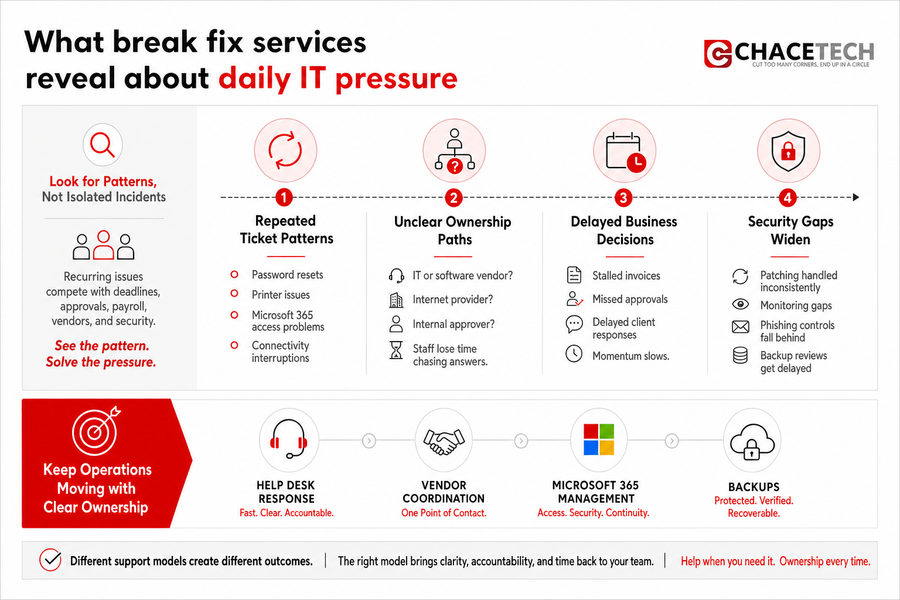
Recurring support issues usually show up inside ordinary work, not in a clean IT report. A password reset delays a proposal upload. A printer problem holds up signed change orders. Microsoft 365 access trouble keeps a manager from reviewing payroll notes before approval.
Look for patterns across tickets, not just one-off incidents.
-
Repeated ticket patterns: Recurring password resets, printer issues, Microsoft 365 access problems, and connectivity interruptions often point to training gaps, aging equipment, or settings that need cleanup.
-
Unclear ownership paths: Staff lose time when no one knows whether the issue belongs to IT, a software vendor, an internet provider, or an internal approver.
-
Delayed business decisions: Unresolved access or email problems stall invoices, approvals, and client responses.
-
Security gaps widen: Reactive support can leave patching, monitoring, phishing controls, and backup reviews handled inconsistently.
That’s where the support model starts affecting planning. Help desk response, vendor coordination, Microsoft 365 management, and backups all shape whether teams keep work moving without repeated interruptions.
Comparing Break Fix Vs Managed Services Through Business Continuity
Reactive support focuses on restoring service after staff already feel the disruption. Managed support adds prevention, monitoring, updates, backups, and planning before that disruption reaches a project meeting or customer deadline. ChaceTech handles that work through 100% Houston-based staff, with no outsourced helpdesk or overseas escalation, so the person taking the call understands the pace of the work and the client’s environment.
The same team that installs or redesigns a system also maintains it. That matters when internet, software, hardware, and licensing issues overlap.
An engineering team is preparing bid materials for a morning deadline when a network issue blocks access to shared drawings, email attachments, and Teams meeting notes. The project manager needs updates for the client, the estimator is waiting on files, and the office coordinator is trying to confirm who has the latest version. Clear communication reduces guessing while the fix is underway.
The value is fewer surprises, clearer ownership, and better preparation for deadlines through monitoring, patch management, vendor management, and backup verification.
How Break Fix And Managed Services Affect Budgets
-
Emergency costs become visible
An unexpected server issue during a customer deadline can bring after-hours labor, replacement hardware, and urgent vendor calls into the same week’s budget. -
Approvals slow the fix
Purchase approvals can delay replacement equipment, license renewals, or service restoration while staff wait on finance, operations, and leadership. -
Planning reduces avoidable spend
Scheduled updates, lifecycle planning, warranty tracking, and backup checks help you see what is coming before a device fails or a renewal expires. -
Security needs steady funding
Email protection, monitoring, anti-malware, phishing protection, and firewall care work best as regular operating discipline, not one-time cleanup. -
Leaders need clear forecasts
ChaceTech flat-rate managed IT approach puts security, Microsoft 365 management, and backups under one predictable rate, which makes it easier to compare priorities for staff growth, office moves, and new software.
Budget clarity leads directly into service accountability across ticket handling, licensing, warranties, and security tools.
Explore Managed IT Options
Where Break Fix Support Fits Within Vendor Coordination
The internet provider blames the firewall, the software vendor blames the workstation, and staff repeat the same details in three separate tickets. Business systems rarely fail in isolation, especially when accounting software, Microsoft 365, internet service, printers, and local devices all touch the same workflow. Break fix services become painful when staff have to translate technical details between providers while invoices, approvals, or client updates wait.
-
Licenses and renewals: Microsoft 365 seats, software subscriptions, expired licenses, and approval timing need one clear owner so access does not lapse.
-
Warranties and hardware: Device failures require warranty checks, replacement coordination, purchase approvals, and setup that keeps the employee working.
-
Internet and connectivity: Provider tickets, firewall checks, access points, and network troubleshooting need coordinated updates that explain what is being tested.
-
Software vendor tickets: Accounting, project management, and line-of-business systems often need clear technical details before vendor support can move.
Before changing support models, gather the information that removes guesswork, including documentation, vendor contacts, renewal tracking, and escalation paths.
Move Beyond Reactive IT Support
If break fix issues keep slowing your team down, ChaceTech can help you plan managed support with clearer ownership and fewer repeat disruptions.
Practical Next Steps For Moving From Break Fix To Managed Services
Changing support models affects staff habits, budget expectations, and approval processes, so the work should be staged. A practical review helps people understand what will change, who owns each step, and which systems need attention first.
-
Map recurring tickets first: List the systems, people, locations, and vendors involved in frequent requests, such as password resets, printer queues, VPN access, and shared file issues.
-
Review security basics: Check backups, email filtering, anti-phishing controls, endpoint protection, updates, and firewall care. Tools such as SentinelOne and Guardz fit into this coverage, but process still matters.
-
Document vendor ownership: Identify who manages software, licensing, warranties, internet service, and hardware purchases, including approval contacts.
-
Set response expectations: Define which issues need immediate phone support, after-hours response, onsite help, or scheduled maintenance.
-
Plan the first quarter: Prioritize high-risk systems, aging hardware, Microsoft 365 cleanup, and backup verification.
Those steps tie help desk support, security management, vendor coordination, and technology planning to the way work actually gets done.
Choosing Managed IT Support With Clear Ownership
The right support model reduces recurring interruptions, clarifies who owns vendor and system issues, improves planning, and makes support costs easier to forecast.
ChaceTech brings 100% Houston-based staff, no outsourced helpdesk or overseas escalation, and responsive communication tied to real accountability. If you’re tired of project teams waiting on files, invoice approvals stalling, or vendors passing tickets back and forth, contact ChaceTech and we’ll help you review tickets, vendors, Microsoft 365, security, backups, and planning under a flat-rate managed IT approach.